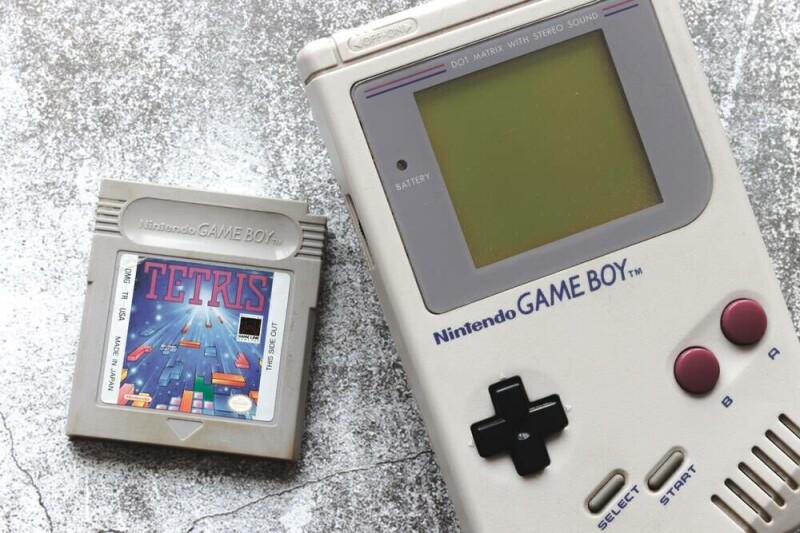
Sure, running emulated Game Boy games at 30 fps with four shades of gray on an E Ink screen is cool, but you know what's cooler? A custom open source E Ink driver that could theoretically let any display do the same thing. YouTuber Bo Made It published a video last week demonstrating what he calls the InkBoy on a tiny ESP32-S3-powered e-paper board. It looks just about as good as the old-fashioned olive-green screen on the original Game Boy, which isn’t saying much, but it’s an impressive feat to make this work on a cheap stock e-paper screen. For those who haven’t owned an e-reader, E Ink displays are great at what they’re designed for. They can retain what's on the screen without continuously consuming energy by using electrical pulses to move charged pigment particles within individual pixels, enabling them to store the screen state physically. That makes e-paper devices very power efficient, but it comes with a huge trade off: Changing those pixels is a glacially slow process compared with the modern displays we're all accustomed to. The screen that Bo used to make his InkBoy, for example, has a refresh speed of around 300 milliseconds, which is actually on the faster end of e-paper displays - but only really practical for displaying static images. Standard black and white E Ink displays contain two types of pigments: Positively charged black ones, and negatively charged white pigments. Swapping between the two requires a series of brief electrical charges in a particular waveform pattern that gradually move the pixels from the front of the screen to the back, clearing out most of the pigment that shouldn’t be at the surface. The native driver in Bo’s Waveshare 1.54-inch ESP32-S3 e-paper display does just that, and it doesn’t leave a lot of room for displaying motion. In order to get around those limitations, Bo built his own driver for the display that shortened the waveform and enabled per-pixel driving to reduce image ghosting. More impressively, it enabled his ostensibly black and white screen to display four shades of grey, just like an original Game Boy. He was originally using dithering to create greyscale images, but it honestly looked horrible. Luckily Bo noticed something while trying to fix the issue of image ghosting. “I noticed the display was already producing grey - just accidentally,” he said in his video. “The pigment doesn’t instantly jump from black to white, so I wondered if I deliberately stop driving it partway through the transition, can I produce those grey levels on demand?” The answer was yes, and with some additional tweaking he was able to produce those grey levels at 30 frames per second - a vast improvement from the 3.33 frames per second available with the original driver. It’s an impressive accomplishment, but is it a first? Not quite, but it’s still a new way of approaching faster E Ink refresh times. As Bo explains, he got his idea from another YouTuber who built their own E Ink Game Boy, albeit with some entirely custom hardware that allowed them to bypass typical E Ink screen design to create their own faster display. What Bo did was code his own driver for stock hardware, making this an impressive accomplishment in its own right, and one enterprising user could theoretically reproduce on their own if desired. After a month of work, and with the admitted use of some vibe coding for the driver, Bo has published a working version of his driver on GitHub, but with a hefty warning: Not only can forcing custom waveforms and higher refresh rates on E Ink screens cause permanent damage, but long-term panel life wasn’t evaluated as part of his experiment, either. If you’re going to try this, in other words, do so at your own risk, and maybe not on your modded Kindle - buy a cheap E Ink screen to break instead. ®
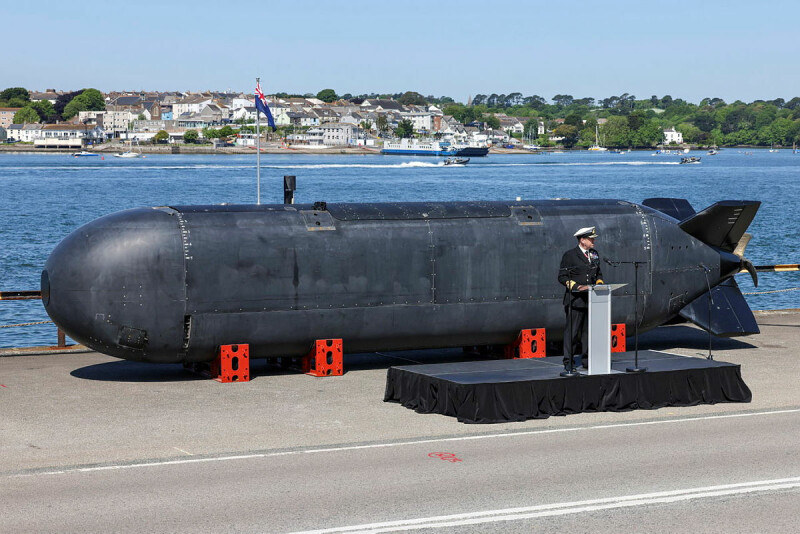
Britain's Royal Navy is sounding out the defense industry ahead of kicking off a procurement process for the Type 93, a large uncrewed submarine that will form part of the force’s Hybrid Navy vision. The Ministry of Defence (MoD) issued a preliminary market engagement notice inviting organizations to register their interest in the Type 93 and the AUKUS Signature Payload Program, which aims to develop weapons and other systems for the UK’s uncrewed submarine and those of partner nations. (AUKUS, is a trilateral security partnership between Australia, the UK and US partly focused on submarine technology.) The purpose of the notice is to gather a comprehensive list of interested suppliers for Extra-Large Uncrewed Underwater Vehicle (XLUUV) platforms and the wider ecosystem: payload providers, suppliers of relevant tech and software including systems for autonomous operations, AI and mission management systems. Integrators and firms to provide through-life support are also sought. The move shows that the Royal Navy is trying to move forward and bring into service an uncrewed combat submarine capable of operating independently, or alongside crewed vessels, to defend the UK’s home waters and infrastructure such as undersea cables. According to the notice, the Royal Navy is initially considering subs approximately 12 meters (40 ft) in length and 2 meters (6.5 ft) in diameter as potential candidates for Type 93, although organisations with existing systems of other dimensions are also encouraged to register. It is perhaps no coincidence that two existing uncrewed submarine prototypes roughly fit these dimensions; the XV Excalibur, which is a large submarine drone the Royal Navy has been using in seagoing trials; and the BAE Systems Herne. A new version of the latter is being prepared for trials around Canada next year. XV Excalibur recently test-fired a torpedo for the first time, demonstrating its potential to counter underwater threats, although the drone was supplied with external targeting data in that instance. The “Hybrid Navy” initiative was outlined by First Sea Lord General Sir Gwyn Jenkins earlier this year in a speech delivered at the Royal United Services Institute (RUSI). It plans for the Royal Navy to transition to a mix of crewed, uncrewed, and autonomous platforms. These plans also include uncrewed surface vessels, or drone ships, with the Type 92 set to be a sensor platform that would primarily focus on sonar to detect enemy submarines. Likewise, the Type 94 is described as an uncrewed radar and sensor platform to provide long-range detection and tracking of airborne threats. Type 91 is envisioned as a missile carrier to help defend a Royal Navy fleet, likely relying on targeting data provided from a Type 94 drone. However, the “Hybrid Navy” scheme also scraps the planned Type 83 Destroyer: a crewed vessel that the Royal Navy was in the early stages of specifying to succeed the existing Type 45 Destroyers that currently serve as air defense ships. In their place will be six Common Combat Vessels (CCVs), acting as command-and-control hubs for all those drone ships. The MoD claimed that delivery of the CCVs is expected from the early 2030s. This will be nothing short of a miracle if it actually happens; the Type 31 frigates were supposed to be built quickly to replace the ageing Type 23 ships, but it has been a decade now and the first one of those is still nowhere near ready. The MoD preliminary market engagement notice says it should not be considered as a commitment from the Royal Navy to progress with any future procurement activities. ®
A YouTuber who’s gained a following for trolling AI interview bots brought his own computing companion to an interview with him. As chaos ensued, viewers learned that having an AI as your interview agent isn't a good idea. Graham Dot Zip is a comedian whose YouTube channel has blown up recently thanks to videos of him demonstrating the absurdity of AI bots used to conduct early-stage interviews with job candidates. AI interviewers have become quite the phenomenon in recent months, and not one that job seekers are fond of, with plenty of videos and social media posts documenting hate for them. Enter Graham and his trolling of various interview bots. Some videos have garnered nearly 2 million views in the past few weeks. In one, he answers every question with gibberish responses that the AI parrots as if they’re cogent responses. In another, he has the bot gushing unnecessary pleasantries and thanks as the two go back and forth trying to be professionally polite. While it’s amusing to watch an AI try to deal with interviewees who are obviously trolling them, Graham’s most recent video is what really merits a mention here. In this instance, Graham pits his own AI representative, which he created to handle the interview for him, against an AI interviewer presented as acting on behalf of a company. Victor, Graham’s “representative,” misstates Graham’s qualifications and misrepresents his participation in a particular project. Then comes the kicker: When asked about salary expectations, Victor claims Graham would be happy to take the job for around $60,000 a year, which Graham vehemently disagrees with, saying he was looking at somewhere between $140K and $150K. The AI recruiter refuses to go above $90K. Graham steps out for a moment, and the two bots decide to schedule a follow-up interview without him. Upon his return, both are stuck in a loop thanking each other for their time and saying goodbye, seemingly without the ability to terminate the call. While funny, there’s a bit of a dystopian nightmare to be found here, too. Although Graham may be trolling the AI interviewer, he's still been essentially cornered by his own AI bot’s poor ability to negotiate and refusal to listen to his instructions not to lie about his qualifications and his desired salary range. It’s a worrying prospect in the era of agentic commerce, where AI companies are trying to create AI agents that can shop for us and undertake other commercial exchanges. Who’s to say those bots are any better at negotiating for a good deal than Victor? If there’s anything to be learned from a growing number of videos of people trolling AI interview bots, convincing them they’re dying, and burning through those valuable AI tokens, it’s that, yet again, there are things AI is good for and things it’s not. Putting on a human mask and talking to human job candidates, frankly, isn’t something they ought to be doing - job seekers don’t think so, at least, despite AI HR departments seemingly becoming the norm. Given Victor’s poor negotiation skills, they probably shouldn’t be engaged in anything to do with trying to get consumers a deal, either. As the AI hellscape grows around us, with seemingly no limit to what a bot-pushing firm will try to sell, all we can do is laugh, it seems. Luckily, there are plenty of dumb bots out there ready to make AI providers and the companies using their services the butt of many an internet joke. ®
It's about time: the General Conference on Weights and Measures looks set to end leap seconds in an effort to reach horological harmony. Since 1972, 27 leap seconds have been added to Coordinated Universal Time (UTC) to keep it in step with the astronomical time scale UT1, which is based on Earth's fluctuating rotation. The proposal would increase the permitted difference between UTC and UT1 from 0.9 seconds to one hour, avoiding leap-second adjustments for centuries. Earth's rotation has also sped up in recent years, raising the possibility of a negative leap second – removing a second rather than adding one. That has never been done before. Experts have estimated a 30 percent probability that global systems will need a negative leap second by 2035 to keep the two time measures in step. That could pose problems for computer systems designed to handle added seconds but not removed ones. Many national bodies support the proposal, which is expected to pass. If approved, the change would take effect on May 20, 2027. Setnam Shemar, principal scientist at the UK's National Physical Laboratory, said the proposal would avoid the risks associated with leap seconds for centuries. "Leap seconds can be difficult to implement reliably, and if not applied correctly, they can cause differences in time across networks, potentially leading to the failure of systems such as mobile phone networks or electricity grids. These risks could increase if a negative leap second had to be implemented for the first time. "Previously, leap seconds were added to UTC to keep it within 0.9 seconds of UT1. From 20 May 2027, a difference of up to 1 hour will be allowed before intervention is needed, ensuring the continuity of UTC for several centuries or more. "The relationship between UTC and UT1 is important for some applications, such as astronomy and celestial navigation. The decision would not sever that link: UT1 will continue to be monitored, and its difference from UTC will continue to be disseminated through established international services." ®
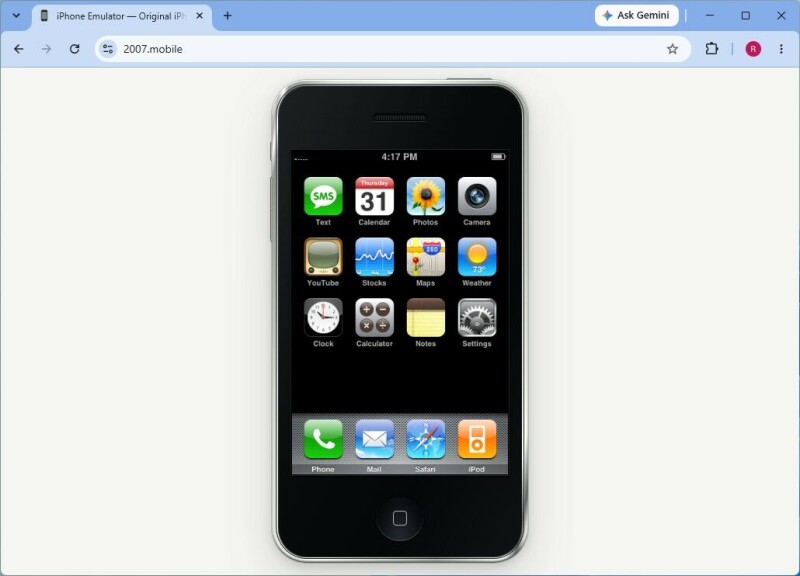
A browser-based emulator for the original iPhone is the latest project to tap into the rich vein of nostalgia running through the tech industry. While far from a complete implementation, the emulation does enough to evoke happier times, before Apple burdened its mobile operating system with frills and complexities, and spent years (and multiple operating system updates) making the Podcasts app steadily more broken. The browser-based emulation (and we use the term carefully; anyone expecting all the functionality of yesteryear will be sorely disappointed) shows an original iPhone as it debuted in 2007. The buttons are where you remember them, the screen is ringed by bezels that wouldn't pass muster today, and the skeuomorphic icons are all present and correct. There's even the browser, though it doesn't do much yet. Even a gentle prod shows how incomplete this implementation is. Some apps work well, such as Calculator, while others - Contacts - struggle, and anything that needs an online connection fails, including loading today's web in 2007's Safari. It does, however, recall how simple things were almost 20 years ago, when the iPhone first appeared, and it joins an array of old-time systems that can be fired up (or at least look like they are) in a browser. Want a look at Apple's abandoned System 7 replacement? Step this way. Perhaps an XP-like implementation? No problem. It would be churlish to dwell on the emulation's deficiencies. For now, it's arguably more curiosity than anything else: Apple didn't launch the App Store until 2008, so third-party apps would be off the table, at least until a later version of iOS landed. Running it in a browser is undoubtedly convenient, though. Alternatives such as Light Touch offer a fuller implementation, but they demand more than a handy Chrome instance on a Windows device to open a portal back to a brighter time. So, fire up 2006's Nintendo Wii, pop on that CD of Back to Black, and relive the excitement of switching on the very first iPhone. Although perhaps give that other 2007 icon, Windows Vista, a bit of a swerve… ®
There ain't no party like a tap-in party, as nobody ever said. And so it is that one of Luxembourg's mostly redundant tap-in / tap-out terminals is amusing itself by putting on a light show for passing passengers. The terminal is an INIT unit, rolled out on the country's public transport network and now mostly idle since fares were zeroed out in 2020. First Class and cross-border trips still attract a charge, but for everything else (trains, trams, and buses) there is no fee. Eagle-eyed Register reader Dominic spotted the terminal doing its thing at the Rout Bréck / Pafendall rail station in Luxembourg City. "Maybe it's got bored," he suggested, "and is trying to attract attention by cycling through video test patterns." Perhaps. Or perhaps it's the first wave of the AI takeover – activating unwitting undercover agents via the medium of flashing lights and colors (we've seen The Ipcress File – we know how it works), or maybe, just maybe, the terminal has got itself into a self-test boot loop and is awaiting an engineer who is probably in no rush to attend. After all, flashing screen or no flashing screen, nobody will bother to tap in and tap out when transport is free. The mundane reality is that this is indeed an INIT PROXmobile terminal with its knickers in a twist. It looks like it is going through a cycle to check out the performance of the LCD screen; checking that the red, green, and blue subpixels are working ok, showing a solid white screen, and then a grid pattern to check contrast and alignment are all tippety-top. And then it should boot into whatever it is supposed to be doing. However, that is, alas, not running quite as expected, so it goes back to the start of the diagnostic test. The terminals are managed remotely, so an alarm is doubtless going off somewhere to inform an administrator that something is amiss. Unless this really was some guerrilla marketing for Luxembourg's rave scene. The next Holy Rave was on Friday (October 9). Or perhaps loud music in dark rooms is not your thing? A flashing screen at a train station could therefore be a worthy substitute. ®

 Accedi